What Is Dental Practice Management Software? A Module-by-Module Guide
What dental practice management software actually does: the schedule, the chart, billing, reminders and reports, what each part replaces and how they work together.
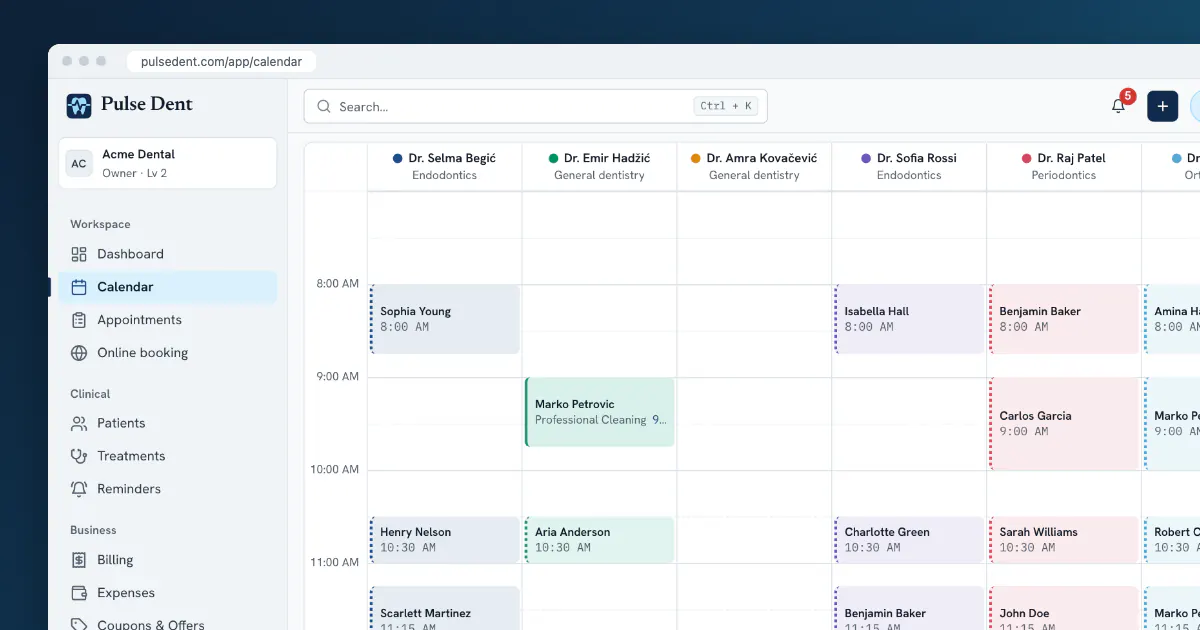
Dental practice management software is the system a clinic uses to run its day: who is coming in, what was done to which tooth, what the patient owes and what needs to happen next. If your clinic works from a paper diary, a stack of charts and a separate spreadsheet for invoices, this software puts those things in one place, so that a change in one of them shows up in the others.
This guide explains what the software does, module by module, for people who have not used it before or who only know one product. It is not a list of vendors. If you are already comparing products, our buyer's checklist goes deeper into that decision.
The short version
Almost every system in this category covers the same core jobs:
- Scheduling: a calendar by chair and by dentist.
- Patient records: contact details, medical alerts, notes and documents.
- Clinical charting: a tooth chart with conditions and treatments.
- Treatment planning: what is proposed, at what price, in what order.
- Billing: invoices, payments and balances.
- Patient communication: reminders and recalls.
- Reporting: production, collections and how full the schedule is.
The value is less in any single module than in the connections between them. An appointment leads to a treatment, the treatment leads to an invoice, and the invoice feeds the monthly numbers, without anybody typing the same thing three times.
Scheduling: the screen your front desk lives in
The calendar replaces the paper diary. A good one shows each chair or dentist as a column, so the receptionist can see at a glance where a 60-minute slot exists. It also records why time is unavailable, such as a meeting, a break or equipment service, so that nobody books over it.
Because the calendar holds real data, other things can hang off it: automatic reminders, a public booking page that only offers free times, and reports on how much chair time was used. We look at this module on its own in our guide to dental scheduling software.
Patient records and the dental chart
The record is everything you know about one patient, in one place: contact details, allergies and medical alerts, visits, notes, documents and images. In paper terms, it is the folder, except that several people can read it at once and it cannot be left in the wrong room.
The dental chart is the clinical heart of the record. Each tooth is selectable, conditions and treatments are recorded against it, and the chart builds up a history over time. Clinics in most of Europe use FDI numbering; US clinics usually use the Universal system. The software should use the one your dentists think in.
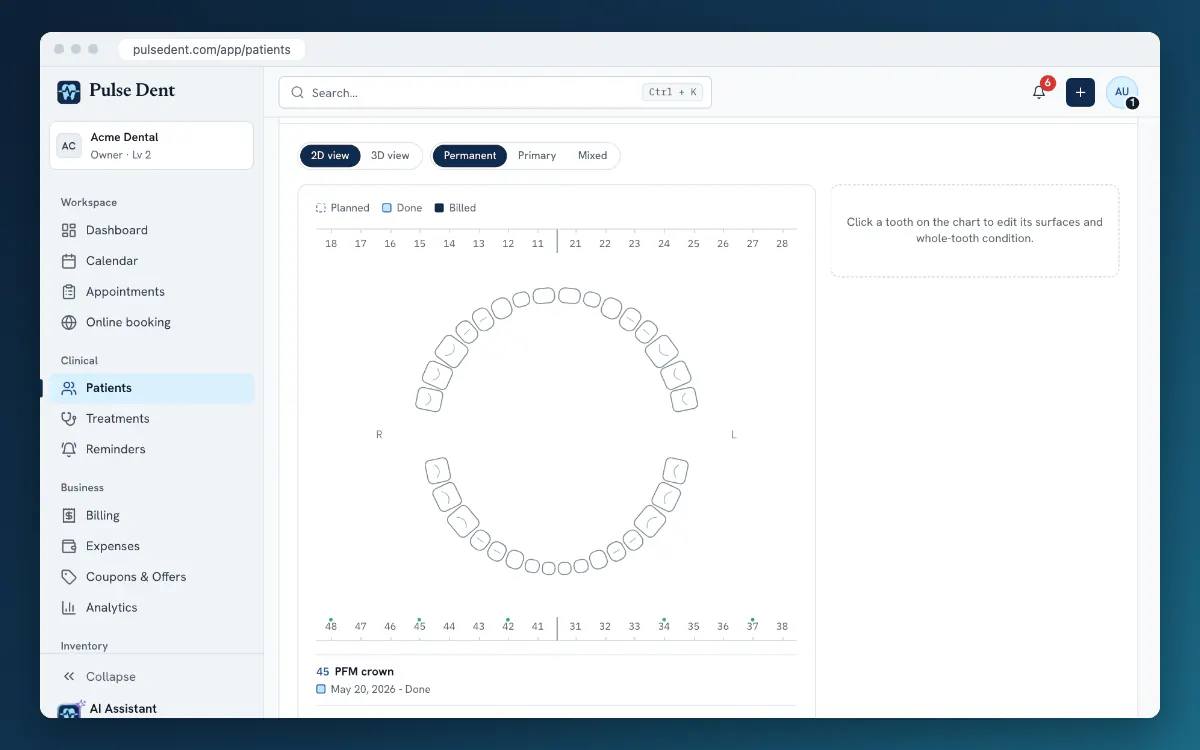
More specialised charting, such as a periodontal chart with six probing sites per tooth, is often part of the same record. Our article on digital patient records covers what belongs in the record and why.
Treatment plans: from diagnosis to a yes
A treatment plan lists the proposed work with teeth, prices and order. In software, the plan is not just a document. Once a patient agrees, the planned items can become appointments, completed treatments and invoice lines. That removes a common source of lost income: work that was done but never billed because the note did not reach the person writing invoices.
Billing and payments
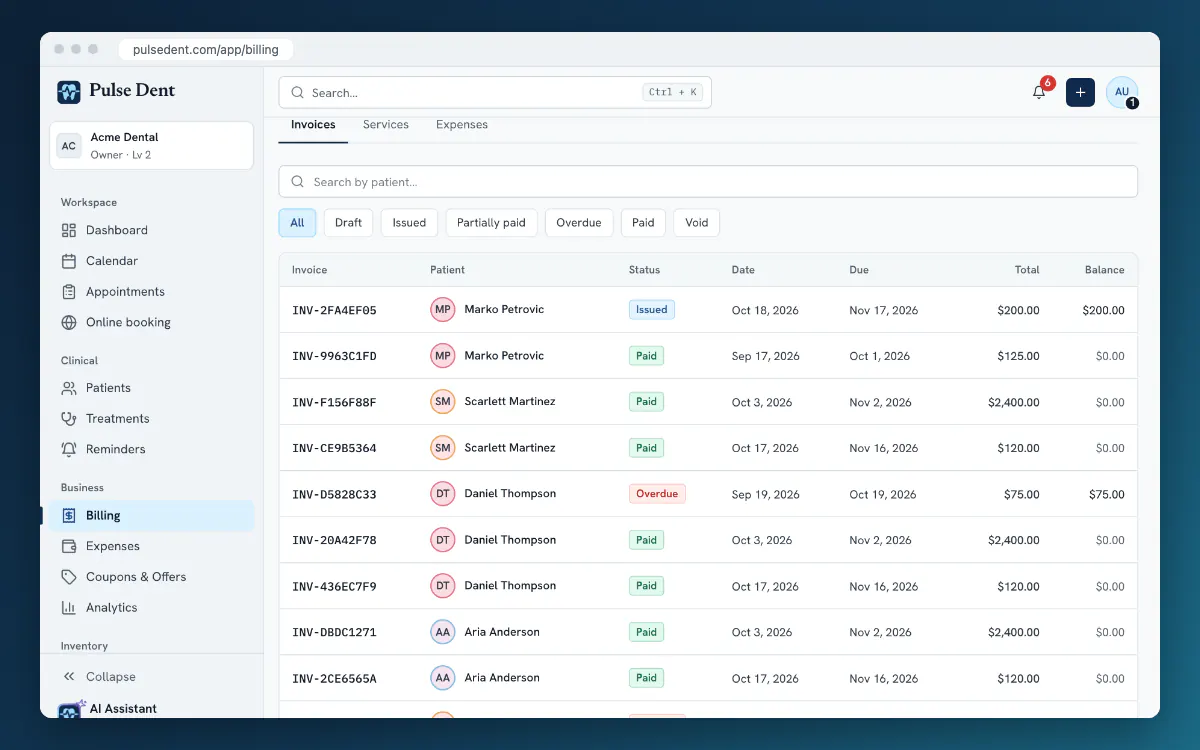
This module issues invoices, records payments, including partial ones, and shows what each patient owes. For a manager, the most useful thing is often a single list of who has an open balance and how old it is. Check that the software handles your currency and your local invoicing rules. In some countries, invoices also have to go through a fiscal device or an online tax system, and that is worth asking about before anything else.
Reminders and patient communication
Automatic reminders are often the quickest part of the software to show a return, because every appointment that is kept is chair time that would otherwise be lost. Reminders usually run from templates: for example, an email 24 hours before each appointment. Recalls work the same way, bringing patients back for their next check-up. Many systems add a patient portal, where patients can see their appointments and documents without calling the clinic.
Inventory, staff and reports
These modules are less visible but matter as a clinic grows:
- Inventory tracks stock, batches and expiry dates, and shows what is running low before a material runs out in the middle of a working day.
- Staff covers roles, working hours and, in some products, pay. Roles matter because a receptionist does not need the same access as an owner.
- Reports turn all of the above into a short list of numbers. See dental practice KPIs for which ones are worth watching.
Do small clinics need it?
A solo dentist with one assistant can run on paper, and many have. What usually changes the answer is one of three things: patients expecting reminders and online booking, a second chair or dentist that makes the paper diary hard to share, or a wish to see the numbers without spending an evening adding them up. A small clinic also has fewer people to train and less data to move, so it is often the easiest time to switch.
What it does not do
Software does not fix an unclear process. If nobody owns the follow-up on unpaid invoices today, a report of unpaid invoices will simply be ignored. It also does not replace clinical judgement or your obligations around patient data: you remain responsible for what is recorded and how it is protected. Our GDPR checklist covers that side.
Frequently asked questions
Is dental practice management software the same as an electronic health record?
They overlap. A patient record system stores clinical information. Practice management software also runs the schedule, billing and communication around it. Most dental products combine the two.
Does it have to be installed on our computers?
Not necessarily. Cloud products run in a browser, while on-premise ones run on a server in the clinic. We compare the two in cloud vs on-premise dental software.
Can we move our existing patients into it?
Usually, but how much comes across depends on where the data is today. See our migration plan before you commit to a date.
Key takeaways
- Dental practice management software runs the schedule, patient records, chart, treatment plans, billing, reminders and reports in one system.
- The main benefit is the connection between modules: appointment to treatment to invoice to report.
- Check numbering, currency and local invoicing rules first; they are hard to work around.
- Software supports a clear process but does not create one.
Pulse Dent is practice management software that runs in the browser and covers each of the modules above: a calendar by chair, patient records with FDI or Universal charting, treatment plans that become invoices, automatic reminders, online booking, inventory and analytics. Automatic reminders are part of the Advanced plan, which is also what the trial runs on. You can take the product tour, see the plans on the pricing page or start a free 30-day trial.